Written by Herman Groenbroek – 14 February 2026
How I created Monochrome: an Android camera app for Sony Xperia in 2015.
Roughly 10 years ago, I was a big fan of Sony smartphones. In fact, I spent a little too much time researching what smartphones in general were capable of, especially when it came to photography; one of my passions still to this date. Interestingly, Sony's camera and smartphone departments (Alpha resp. Xperia) seemed to share little more with one another than their branding. Sony had already released world's first full-frame mirrorless interchangeable-lens camera in 2013—the Sony α7—which ended up setting the tone for all future camera manufacturers, with mirrorless now being the norm.
The Alpha–Xperia dichotomy
Their smartphone department, Xperia, aimed to make use of the trust that consumers already had in Sony's Alpha brand. They did this by slapping Sony Alpha's "G Lens" branding onto their smartphone cameras, as well as settings like "Superior Auto mode". Unfortunately, branding itself doesn't make a camera perform great[1]. In fact, Sony Xperia phones were notorious for barely including custom settings in their Z-series smartphones: no custom shutter speed, no RAW support, and no ISO setting either. Basically, you could only use the exposure compensation (so: plus or minus a few stops of light) to alter the exposure triangle. Anything else was just done automatically. It really didn't help that while Sony Xperia phones had a fancy shutter button, the camera performance in terms of high ISO (noise) performance and colour science was lacking compared to the competition. They seemed capable, until you actually started using them. They were okay, just nothing spectacular.
[1] Branding like the "G Lens" probably came with qualitative criteria, but again, that does not, by itself, make a camera great in use.
Solvable problems
I am an optimizer. I see something suboptimal, I try to fix. In this case, I noticed two flaws that seemed fixable with Sony Xperia Z-series smartphones back in the day.
- When picking a scene called "Night Mode", the ISO seemed to be set to a minimum and thus the shutter speed would always be lower than on ("superior") auto mode.
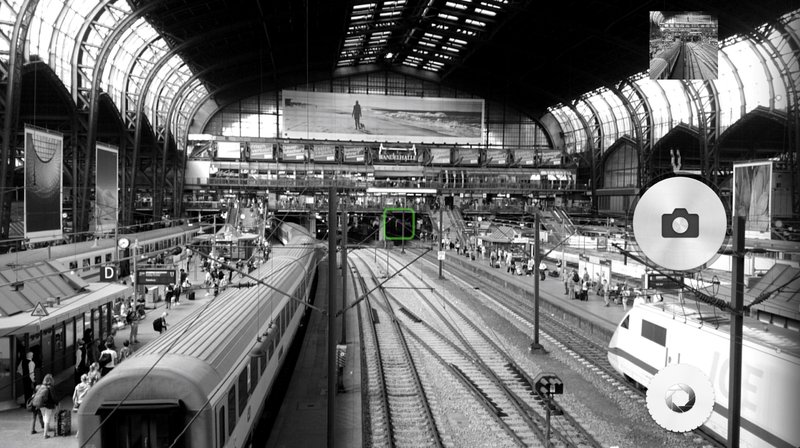
- There was an internal "camera app" framework for Xperia smartphones, and it had an option for effects like Black & White. However, this Effects app was developed horribly: it was lagging so much it only showed 5 frames per second in the viewfinder.
As I was studying my Bachelor's in AI and I just learned Object-Oriented Programming in Java, I figured, why not challenge myself to see if I can develop an Android camera app. I found a way to develop for the Xperia camera framework, contacted Sony's developer team, and off I went.
Meet Monochrome: my two-in-one solution
The moment I got my first hello-world camera app running using Android Studio, I noticed that Android already provided pre-implemented camera functions. This was even before Android's Camera2 API that made camera app development even easier and more capable.
- For one, I noticed that making my basic camera app shoot black & white was as simple as calling an available function. Apparently, Android had a couple of built-in effects already. Imagine how shocked I was that Sony's official effects app was so laggy. This function worked flawlessly instead! "I already have my value proposition", I must've thought.
- Secondly, I wanted Night Mode to be the default shooting mode. As we saw, using Night Mode was the main method to ensure you get a low ISO, so effectively it was one of the only ways to manually change settings for the aforementioned exposure triangle. I was pleasantly surprised to see that Night Mode was also just a predefined function call away!
- Of course, the user had to be able to change settings too. Now I wasn't a UI/UX designer, and I didn't want to spend the time either: I had already wasted precious studying time developing an app instead. So I thought: "fake it 'till you make it, right?". I saw an example of swiping gestures in the code, and decided to simply use that to change settings. I mentally visualized a column of possible parameters for each setting like shooting mode, output resolution, et cetera. I figured I'd simply let the user swipe left and right across the viewfinder to pick a setting, and up/down to change that setting. For minimalism, which I pretended to be a good thing, I let the user know where in this mental visualisation they were with a simple textual toast message. It's kind of hard to explain, but it's also horrible UX that I pretended was modern and minimalistic. To clarify: there was no feedback to the user at all when changing settings apart from a pop-up toast message on every swipe. But a good salesperson can sell anything, right? :-).
And there you have it, I developed & published my app called 'Monochrome' to the Google Play Store shortly thereafter, and I wrote all about it on a blog I'd rather forget about.
Sony didn't like it enough
The main user experience portion that I cared about was making sure my app wasn't just a random camera app in the Google Play Store, but instead would be fully integrated into Sony Xperia Z-series' Camera Framework: effectively an in-camera list of installed, and installable, camera apps. "Wouldn't it be great if my app got featured there, as well?".
I only managed half. As vague as it was for me, having never had developed an Android app before, and having to set the app's metadata just right to show up inside this Xperia camera framework, I was amazed when I finally got this working. This meant my camera app was no longer a standalone application that I had to find on the home screen or apps list, but instead I could access from inside the camera app, which automatically opened on shutter button press. A big win for user experience!
Unfortunately however, to make my Monochrome app appear in Sony's recommended apps, I had to contact Sony's developer team again. They responded swiftly with a couple of remarks that needed improving to even be considered in this camera section. I only recall one: I had to give the swipeable settings adjustments a proper, visible UI. I may have stopped reading after this point of feedback. I understood completely. I just wasn't going to change this. I was not a UI developer. I was happy enough I got my app published in the Play Store in the first place.
To my surprise, people managed to find my camera app without doing marketing, and without being in the recommended camera apps section.
I gave away a couple of free app installs just to check out the giveaway feature in the Play Store.
In the end, I learned a lot during this project. I had developed and published my very first Android app – a fully-functional camera app, nonetheless. And I made it work in tandem with Sony's Xperia Camera framework back in the day.
And the best part? I couldn't have guessed that people would actually want to pay for my app (and not request an easy refund, mind you). I didn't dare to ask more than €2 for it. Still, I made slightly over €70 over the course of a couple of years, which was a lot of money for this student. And fun fact: the latest purchase of 'Monochrome' was made in 2022!
Show, don't tell
The app has been removed from the Play Store due to inactivity of me as a developer. In fact, my Play Store developer account was removed altogether, I believe. The fact that I'm unsure tells you enough.
Luckily, you can still find it on the Internet Archive forever.